Animate Old Photos: Bring a Portrait Gently to Life
Animating old photos gives a portrait subtle movement while the person keeps their own familiar expression.
An animated old photo is one still portrait turned into a short, silent AI clip, and ImgColorizer's Animate makes a 5-second MP4 in which the person breathes, blinks and turns the head slightly, with an AI animation label. To animate a photo, you choose a clear, restored or colorized portrait, confirm your right to use it, then watch and download the clip, while the face, clothes, background, tones and calm expression stay the same, and those three steps make it simple to animate old photos with the Animate photo tool.
Works with JPG · PNG · WebP · HEIC · TIFF
Upload a photo to animate
See a real result
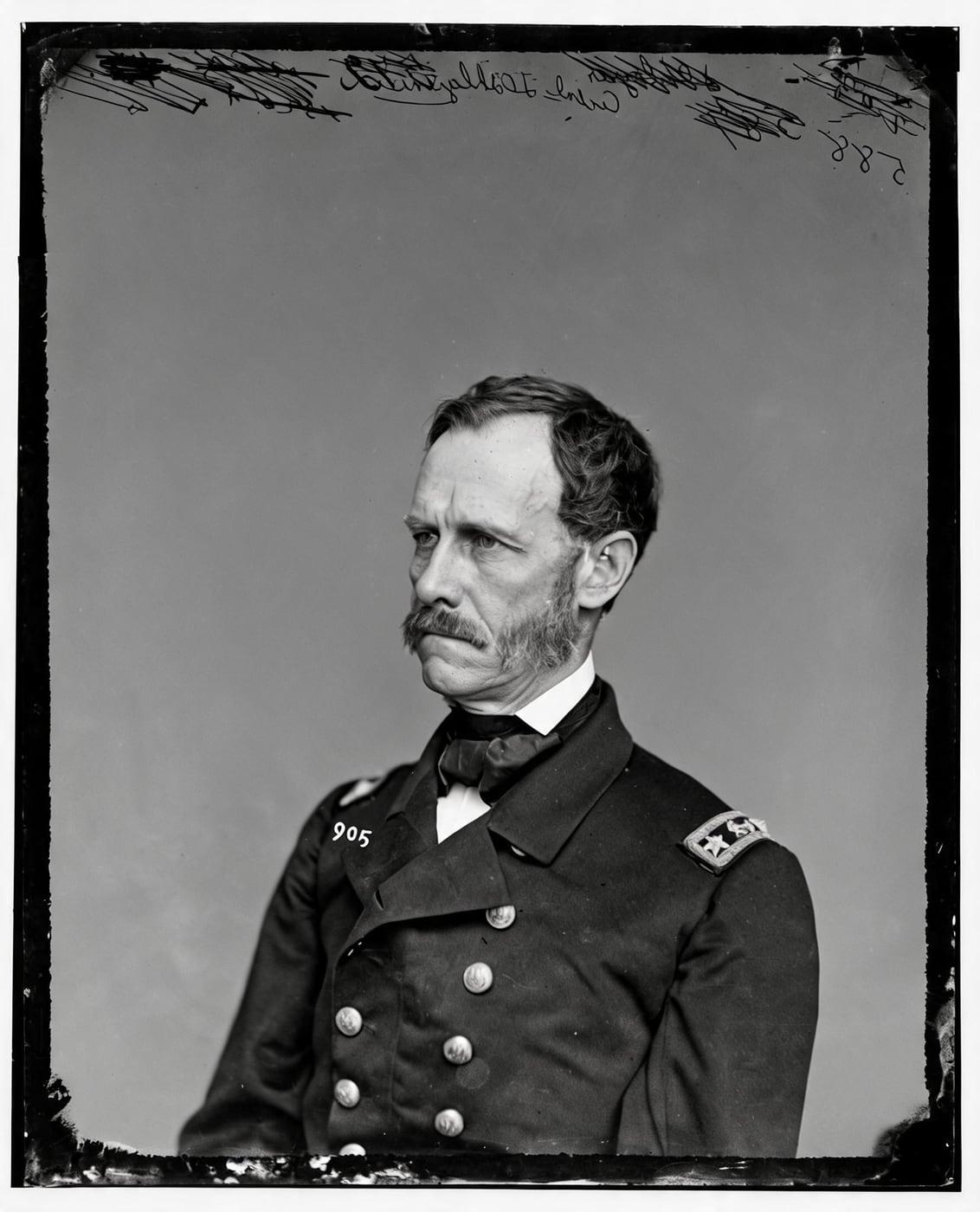 AI animation
How to Animate Old Photos
To animate old photos, choose a portrait, confirm how you will use the clip, then watch and download it.
The photo animator runs in your browser with nothing to install, so learning how to make old photos come to life or how to bring pictures to life takes only those three steps.
The answer to how do you make a photo come to life starts with the first step, choosing the old portrait to animate.
Choose the Old Portrait to Animate
To choose the old portrait to animate, pick a clear, well-lit photo with the face visible and turned toward the camera, then upload it or press "Animate this" on a colorized result. Your chosen portrait then moves to a short consent step, where you confirm your right to use the photo.
Confirm How You Will Use the Animated Photo
To confirm how you will use the animated photo, you accept a short consent step stating that the clip is an AI animation, not a recording, and that you have the right to use the photo. Once you confirm, the finished animated photo is ready to watch.
Watch and Download the Animated Photo
To watch and download the animated photo, open the clip that plays in your account, then select Download to save the animation as an MP4. The MP4 file is yours to share anywhere.
How an Animated Old Portrait Moves
An animated old portrait moves through small, natural movement in a 5-second clip: a slow breath, a blink and a slight turn of the head.
The camera stays completely still with no zoom, so pictures come to life through subtle motion while the original framing stays as it was.
Your alive photo gets an old photo moving effect that keeps the person's own look from the print.
AI animationBring Old Photos to Life With AI
AI brings old photos to life by turning one still portrait into a moving portrait, so ancestors you only knew from a print can be seen breathing and blinking.
The photo animator reads who is in your photo and adds small, natural movement, which is how AI brings photos to life without filming anything new.
To make old photos come to life or make pictures come to life for a family album, you need only one clear portrait.
Each moving portrait comes out as a short video made from that single old photo.
Turn Old Photos Into a Video
To turn old photos into a video, the photo animator converts one portrait into a 5-second silent MP4 with no sound and no speech.
Every AI animation of old photos carries an AI animation label, so nobody mistakes the clip for an original recording.
What Stays the Same When You Animate an Old Photo
The details that stay the same when you animate an old photo are listed below:
Which Old Photos Animate Best?
The old photos that animate best are portraits with a clear, sharp face, because visible features give the AI room for natural movement.
A colorized or restored portrait looks the most lifelike once it moves, so preparing the old photo comes before you animate it.
Prepare an Old Photo Before You Animate It
To prepare an old photo before you animate it, you can colorize it, restore damage, upscale a small image or retouch soft faces with the four tools below.
Colorize
Colorize the Old Photo Before Animating
To colorize the old photo before animating, run it through the image colorizer, which adds natural color to a black and white or sepia portrait while every face stays exactly as it was.
Pressing "Animate this" on the colorized result starts the AI clip.
Colorize a photo1 credit a photo
Restore
Restore a Damaged Old Photo Before Animating
To restore a damaged old photo before animating, use Restore, which repairs scratches, tears, stains and fading without redrawing faces, so the old photo is clean before it moves.
Restore helps you revive pictures from a family album while every face stays as it was.
Restore an old photo3 credits a photo
Enhance
Upscale a Small Old Photo Before Animating
To upscale a small old photo before animating, use the photo enhancer, a precision upscaler that makes a small or soft old photo up to 4 times larger, with a target of about 4,000 pixels.
A larger, sharper portrait gives the animation clearer facial detail to work with.
Sharpen and upscale a photo2 credits a photo
Retouch
Retouch Faces Before Animating an Old Photo
To retouch faces before animating an old photo, use Retouch, which recovers soft and grainy faces one by one and compares each retouched face with your original photo to keep the likeness.
A clearer face gives a more lifelike animated photo.
Retouch a portrait2 credits a photo
Animate Old Photos Pricing
Start with 2 free colorizes. After that, one-time packs from $3.99: no subscription needed, and pack credits never expire.
Starter
$3.99 one time
10 credits · 40¢ a colorized photo
Ten black and white photos in color, or a few restored first.
Family
Most popular$9.99 one time
40 credits · 25¢ a colorized photo
A family album in color, with a clip of the photo you love most.
Archive
$24.99 one time
120 credits · 21¢ a colorized photo
For the shoebox in the attic, the family historian and the local archive.
Animate Old Photos FAQ
The animate old photos FAQ answers questions about general use, features, faces and movement, consent and AI labels, data privacy and pricing.
General Questions About Animating Old Photos
The general questions about animating old photos cover what an animated old photo is, how it is made and what you need to make one.
What Is an Animated Old Photo?
An animated old photo is a still portrait turned into a short, silent AI clip with small, natural movement, such as a breath, a blink or a slight turn of the head.
Animate my photoHow Does Animating an Old Photo Work?
Animating an old photo works by having the AI read who is in the photo, then add a slow breath, a blink and a slight turn of the head while the camera stays completely still. Faces, clothes and background stay as they are, which is how AI can bring pictures to life without recording anything new.
Animate my photoIs an Animated Old Photo the Same as a Live Photo?
No, an animated old photo is not the same as a Live Photo, because a Live Photo is recorded by a phone camera when the picture is taken, while an animated old photo is an AI clip made later from a still print. With Live Photos, an iPhone records what happens 1.5 seconds before and after you take a picture, according to "Take and edit Live Photos" by Apple Support, September 2026. A living photo made by AI shows AI-made movement and never records the person moving when the original picture was taken.
Animate my photoDo I Need an App to Animate Old Photos?
No, you do not need an app to animate old photos, because the photo animator runs in your browser on a computer or phone with nothing to install. Your browser does the job of an app that brings photos to life, so you can skip the search for the best app to animate old photos.
Animate my photoAnimated Old Photo Features
The animated old photo features below cover clip length, file format, sound and the types of photo you can animate.
How Long Is an Animated Old Photo?
An animated old photo is 5 seconds long, with subtle, natural movement from start to finish.
Animate my photoWhat File Format Is the Animated Photo?
The file format of the animated photo is MP4, a video file you can share on phones, computers and social platforms.
Animate my photoDoes an Animated Old Photo Have Sound?
No, an animated old photo has no sound: the clip is silent, with no speech. The 5-second MP4 shows gentle movement and carries an AI animation label.
Animate my photoCan I Animate an Old Group Photo?
Yes, you can animate an old group photo, and every person in the group comes gently to life with small, natural movement. The photo animator adds no new people to the picture.
Animate my photoCan I Animate an Old Photo Without People?
Yes, you can animate an old photo without people, and the scene gets gentle movement while the camera stays still, bringing the image to life.
Animate my photoCan I Animate a Black and White Old Photo?
Yes, you can animate a black and white old photo, and the portrait keeps its own black and white tones in the clip. Colorizing the portrait first gives the most lifelike animated clip.
Animate my photoCan I Animate a Colorized Old Photo?
Yes, you can animate a colorized old photo, and colorizing first is the best way to animate an old photo. Once the image colorizer finishes, press "Animate this" on the result to start the clip.
Animate my photoFaces and Movement in an Animated Old Photo
Faces and expressions in an animated old photo stay the person's own, with only small, natural movement added.
Does Animating an Old Photo Change the Person's Face?
No, animating an old photo does not change the person's face, because the movement stays small and the person keeps their own expression and features. The portrait gains subtle motion without a redrawn face or a different appearance.
Animate my photoDoes an Animated Old Photo Make People Smile or Talk?
No, an animated old photo does not make people smile or talk: the mouth stays closed and still, with no smile, no grin and no talking. Subtle movement stays with the breath, the blink and a slight turn of the head, so the expression is the one in the original photo.
Animate my photoConsent and AI Labels for Animated Old Photos
Consent and AI labels for animated old photos come down to a clear AI animation label and your right to use the photograph.
Is an Animated Old Photo Labeled as AI?
Yes, an animated old photo is labeled as AI, with an AI animation label on every page that shows the clip. When you share the clip, say that the clip is an AI animation so viewers do not mistake it for an original recording.
Animate my photoCan I Animate an Old Photo of Someone Else?
Yes, you can animate an old photo of someone else, but only when you have the right to use the photo. The consent step asks you to confirm that right before the clip is made.
Animate my photoAnimated Old Photo Data Privacy
Animated old photo data privacy covers what happens to the photos you upload to animate.
What Happens to the Photos I Upload to Animate?
The photos you upload to animate are used only to make your animated photo. Your browser strips location data before the upload, and the servers delete the files within 24 hours. Uploaded portraits are never used to train AI.
Animate my photoAre Photos I Animate Used to Train AI?
No, photos you animate are never used to train AI, and the photo animator uses each upload only to make the clip you asked for.
Animate my photoAnimate Old Photos Pricing Questions
The animate old photos pricing questions below cover what a clip costs, whether animation is free and how credits work.
How Much Does It Cost to Animate an Old Photo?
Animating an old photo costs credits from a one-time pack or an optional monthly plan.
Animate my photoIs Animating Old Photos Free?
No, animating old photos is not free: each animated photo uses credits from a pack or plan, while downloading the finished clip is free. Animate has no way to animate old photos free or bring old photos to life free, because every clip uses credits.
Animate my photoDo Animation Credits Expire?
No, animation credits from one-time packs never expire, so you can use them whenever you are ready to animate old photos.
Animate my photoBring an Old Portrait Gently to Life
To bring an old portrait gently to life, ImgColorizer's Animate adds small, natural movement while the person keeps their own expression and features.
A breath, a blink and a slight turn of the head bring a picture to life, and every clip carries an AI animation label.
Whether you are bringing your photos to life or bringing old photos back to life, animating old photos with Animate keeps the movement gentle.