Restore Old Photos: Repair Scratches, Tears and Fading
Restore old photos helps you restore old photos by finding the scratches, tears, creases, stains and fading in your photo, then repairing them in about a minute without redrawing the people.
ImgColorizer's old photo restoration runs in three steps (upload, choose the options, then compare and download), with the option to add color in the same pass, while companion tools colorize, sharpen, retouch and animate the same photo. Every picture repaired by the AI photo restoration tool keeps the original faces unchanged, so your old photos restored still show the people you remember.
Works with JPG · PNG · WebP · HEIC · TIFF
Upload a photo to restore
See a real result
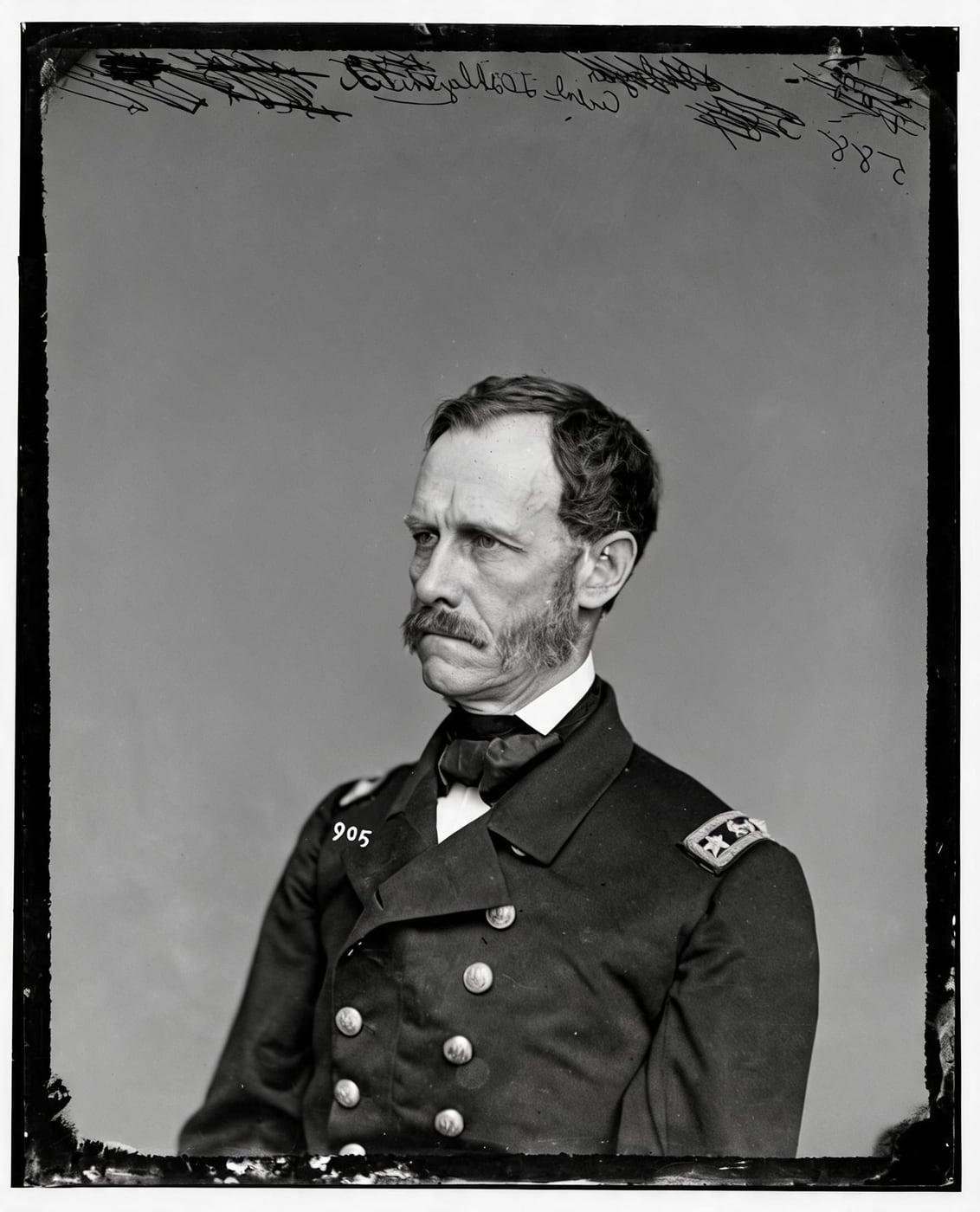
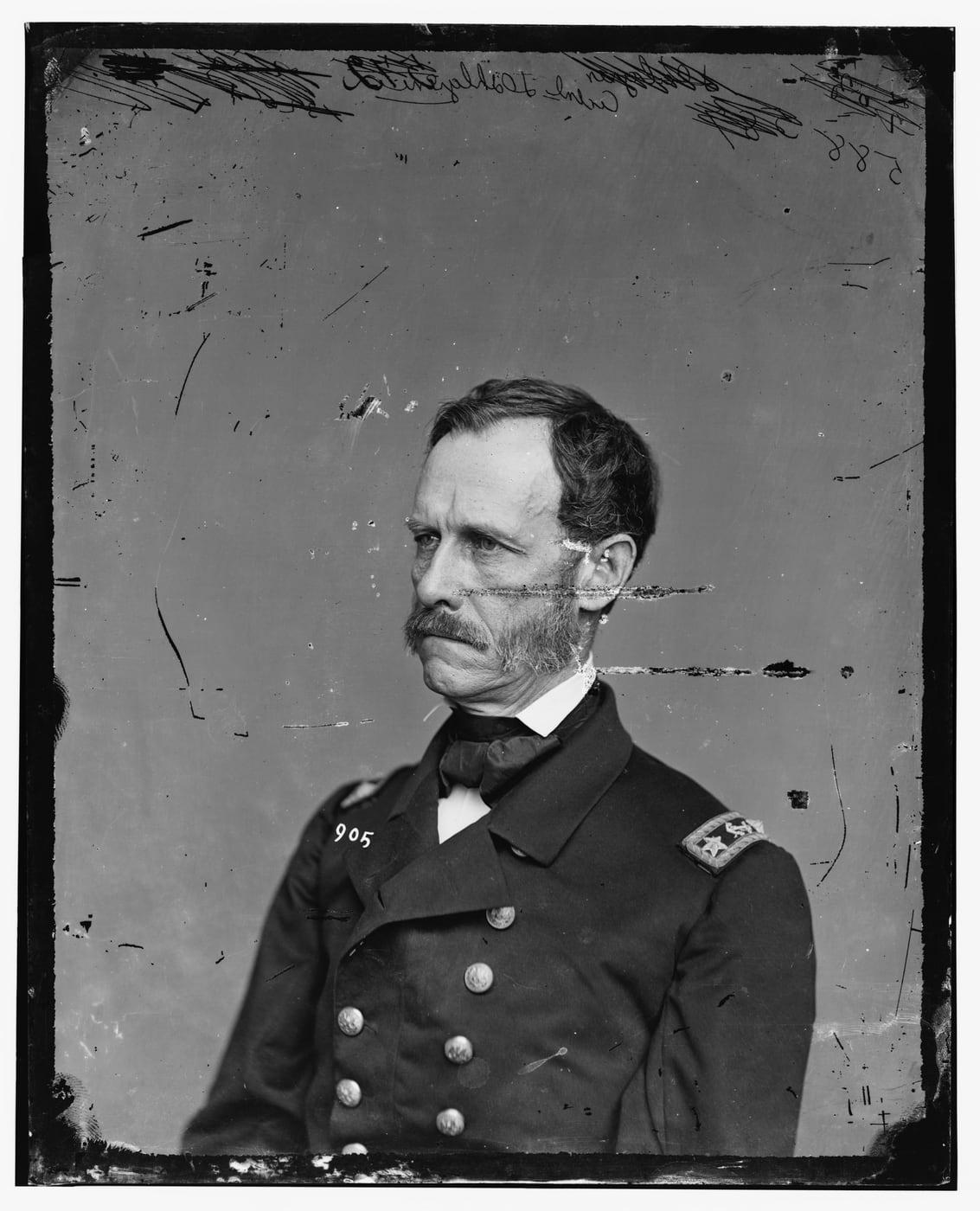
How to Restore Old Photos
To restore old photos, upload the damaged photo, choose the options, then compare and download the result.
The photo restoration tool runs in your browser in about a minute, with nothing to install, so restoring old photos, fixing old pictures and repairing old photographs all follow the same three steps.
Learning how to fix old photos or how to repair old photos starts with the first step, the upload.
Upload the damaged photo
To upload the damaged photo, add a scan or a straight phone picture of the print, taken in soft light without glare, as a JPG, PNG, WebP, HEIC or TIFF file. Restore accepts old and damaged photos up to 40 MB, and once the upload finishes, your damaged photo restoration moves on to the options.
Choose the options
To choose the options, tick Add color too to colorize the repaired photo in the same pass for no extra credit, ask Restore to remove handwriting, pen marks or stamps, or request two versions to choose from. Restore then prepares each version you selected for the before and after view.
Compare and download
To compare and download the restored photo, move the slider between the damaged original and the restored version, then save the one you prefer. Downloads of old photographs restored with Restore are free and unlimited, so each restored picture can be saved as many times as you like.
Fix and Repair Damaged Photo Online
The photo repair tool fixes damaged photos online by removing scratches, dust, spots and fine cracks, mending tears, creases and missing corners, and lifting fading, yellowing and stains.
Damaged photo repair keeps expressions, clothes and backgrounds as they were, so you can repair old photos, repair pictures and fix old photographs online without anyone being redrawn.
Old photo repair works the same way on every print you upload, one photo per run.
Best Old Photo Restoration Online
The best old photo restoration online gives you AI photo restoration in your browser, with no photo restoration software or app to install.
Online photo restoration with Restore checks every face against your upload before you see the result, and a version that fails that check costs nothing because its credits come back.
When you compare online photo restoration tools, AI-powered photo restoration tools or online photo restoration services, ask whether faces are checked and whether a failed version is charged.
Picture restoration online continues below, from restoring an old image to the old photo editor.
Old Image Restore Online
Old image restore online works in three moves: the image restoration tool reads the old image, maps its damage, then mends each flaw on your upload, with nothing to install and nothing redrawn.
Image restoration online lets you restore old photos online or restore a photo online with AI image restore, keeping the people and the scene of the original.
Antique Photo Editor
The antique photo editor removes scratches, cracks, stains and fading from antique and vintage prints without changing expressions, clothes or backgrounds.
As a photo editor for old photos, the old photo editor handles antique photo restoration and vintage photo restoration, so you can restore vintage photos and edit old photos while the original image stays intact.
Our Suite of AI Image Restoration Tools
Every AI image restoration tool works on the same photo, so you restore the damaged print first, then colorize it, sharpen it for printing, retouch faces or animate a portrait.
AI photo restore repairs the damage, and the four tools below take the restored photo further.
Colorize
Image Colorizer
The image colorizer adds natural color to a black and white or sepia photo while your scan keeps its own light and shade, so faces stay exactly as they were.
Colorized photos keep the size of your upload, up to 8,000 pixels on the long side.
Colorize a photo1 credit a photo
Enhance
Photo Enhancer
The photo enhancer uses a precision upscaler instead of a generative model, so the upscaler sharpens what the camera recorded and makes a restored photo 1.5 to 4 times larger, toward about 4,000 pixels.
To make old photos look new, restore the print first, then send the restored photo to the photo enhancer to make the old photo clearer and high resolution without inventing new content.
Sharpen and upscale a photo2 credits a photo
Retouch
Retouch Portraits
Retouch, the AI portrait restoration tool, recovers soft and grainy faces one by one, keeps the size, framing and expressions, and checks the likeness before you see the result.
Old photo retouching with Retouch lets you touch up old photos and retouch old photographs while every person stays recognizable.
Retouch a portrait2 credits a photo
Animate
Animate Old Photos
Animate turns one restored portrait into a 5-second silent MP4 where your ancestor breathes, blinks and glances aside.
Each clip carries an AI animation label, so viewers know the motion is AI-made, not a recording.
Animate an old photo8 credits a clip
Simple Pricing, Credits That Last
Start with 2 free colorizes. After that, one-time packs from $3.99: no subscription needed, and pack credits never expire.
Starter
$3.99 one time
10 credits · 40¢ a colorized photo
Ten black and white photos in color, or a few restored first.
Family
Most popular$9.99 one time
40 credits · 25¢ a colorized photo
A family album in color, with a clip of the photo you love most.
Archive
$24.99 one time
120 credits · 21¢ a colorized photo
For the shoebox in the attic, the family historian and the local archive.
Restore Old Photos FAQ
The questions below about restoring old photos are grouped by general use, features, faces and AI, data privacy and pricing.
General Questions About Restoring Old Photos
Restore is a browser-based photo restoration tool that repairs old photographs for families, genealogists, archivists and creators by reading each upload, mapping its damage and mending each flaw.
What is a restore old photos tool?
A restore old photos tool is a web tool that repairs scratches, tears, stains and fading in old photos without redrawing the people in them. Restore is an online photo restorer and image restorer that brings digital photograph restoration to your browser, with no software to install.
Restore my photoWhat is the purpose of restoring old photographs?
The purpose of restoring old photographs is to repair the damage that years in albums, boxes and frames leave, so the people and the moment in the photo can be seen, printed and shared again. Old photograph restoration fixes the fading, yellowing, abrasions and tears that light, humidity, acidic album pages and careless handling cause in prints, as the Northeast Document Conservation Center documents in "5.3 Care of Photographs" (revised 2019), while the print keeps its original character.
Restore my photoWho should restore old images?
The people who should restore old images are families and genealogists keeping ancestors' photos, history lovers working with archive prints, and creators who need an old image clean enough for a project. Where to restore old photos or where to restore old pictures has a simple answer: Restore repairs them online in your browser, so you can get old photos restored without mailing a print.
Restore my photoHow Does the Restore Old Photos Tool Work?
The Restore Old Photos tool works by reading your photo first, mapping its scratches, tears, stains and fading, then mending each flaw. Before you see a result, old photo restoration AI compares every version with your photo to check that faces and identities stay the same. Traditional photo restoration relies on manual retouching, while AI photo repair can restore old photos in about a minute.
Restore my photoDo I Need an App to Restore Old Photos?
No, you do not need an app to restore old photos, because Restore runs in any browser on a computer or phone with no app or software to install. Anyone searching for a restore old photos app, an old photo restoration app, a picture restoration app or a photo repair app gets the same repair from Restore in the browser, with nothing to download.
Restore my photoRestore Old Photos Features
The Restore Old Photos features below cover color, missing parts, handwriting, versions, output size and the files you can upload.
Can I restore and colorize an image in one go?
Yes, you can restore and colorize an image in one go: tick Add color too, and the photo is repaired and colorized in one pass for the same credits.
Restore my photoWhat to do if part of the old photo restored is missing?
If part of the old photo is missing, Restore fills small gaps such as a corner, a chip or a tear to match the surrounding image. Old torn photo restoration repairs a damaged old photo or damaged old pictures in the same way, but a face or a person that is mostly gone is never invented.
Restore my photoCan Restore Remove Handwriting From Old Photos?
Yes, Restore removes handwriting, pen marks and stamps from old photos when you ask, and by default those markings stay on the restored photo. Keep the original scan when the writing holds names, dates or family history.
Restore my photoCan I Get Two Restored Versions of One Old Photo?
Yes, you can ask Restore for two restored versions of one old photo and keep the version you prefer. Compare both restored versions with the damaged original before you choose.
Restore my photoWhat size is the restored photo?
The restored photo is about 2,048 pixels on its long side. For a high resolution old damaged photo and a big print, the photo enhancer makes the restored image larger.
Restore my photoWhich Files Can I Upload to Restore Old Photos?
The files you can upload to Restore Old Photos are JPG, PNG, WebP, HEIC and TIFF, up to 40 MB each. Upload a scan or a straight phone picture of the printed photo.
Restore my photoFaces and AI When You Restore Old Photos
Restore compares each version with your original photo before showing it and labels every accepted result as AI-processed in its IPTC metadata.
Does Restoring an Old Photo Change Faces?
No, restoring an old photo does not change faces, because Restore compares every version with your photo before you see it. A version that changed anyone is never shown, so faces, expressions and backgrounds stay as they appear in the original.
Restore my photoIs a Restored Old Photo Labeled as AI-Processed?
Yes, every restored photo carries the standard IPTC label for AI-processed images in its metadata. The embedded label shows AI involvement to anyone who checks the image metadata.
Restore my photoRestore Old Photos Data Privacy
Restore Old Photos Data Privacy covers how the old photos you upload are used, protected, stored and deleted.
What Happens to the Old Photos I Upload?
The old photos you upload are used only to make your result, and your browser strips location data before each photo is sent. Restore deletes uploads from its servers within 24 hours, while your results stay in your account until you delete them.
Restore my photoAre Old Photos I Restore Used to Train AI?
No, old photos you restore are never used to train AI. Restore uses each upload only to make your requested result.
Restore my photoRestore Old Photos Pricing Questions
The pricing questions below cover what restoring costs, what is free and how Restore credits work.
How much does it cost to restore a photo?
Restoring a photo costs credits from a one-time pack or an optional monthly plan for each restored version. A version that fails its check costs nothing, because Restore returns its credits.
Restore my photoIs Restoring Old Photos Free?
No, restoring old photos is not free, because each restored version uses credits, while downloading the result is free. Old photo restoration online free and restore old photos online free apply only to the download, so free photo restoration means saving the finished photo, never the repair itself.
Restore my photoDo Restore Credits Expire?
No, Restore credits from one-time packs never expire. Monthly plans are optional, and pack credits stay in your account until you use them to restore old photos.
Restore my photoWhat If a Restored Old Photo Fails the Check?
If a restored old photo fails the check, Restore never shows that version and returns its credits. A version that changed anyone's face stays hidden, so every restoration you see kept each person as they were.
Restore my photoRestore Old Photographs: Repair Scratches, Tears and Fading
To restore old photographs, ImgColorizer's Restore repairs scratches, tears, creases, stains and fading while every face, expression and background stays the original's.
Restoring old damaged photos with Restore lets you restore an old faded photo, restore faded pictures and remove scratches from old photos, and a version that changes anyone is never shown.
The restored photo you download carries every repaired scratch, tear and faded tone.